Slaan oor na hoof inhoud
eLearn
  • Tuisblad
  • Kalender
  • Schools
    APPLIED BUSINESS
    ARCHITECTURE
    BRIDGEPOINT
    BUILDING CONSTRUCTION
    CIVIL ENGINEERING AND LAND SURVEYING
    COMMUNITY STUDIES
    COMPUTING, ELECTRICAL AND APPLIED TECHNOLOGY
    CREATIVE INDUSTRIES
    ENVIRONMENTAL AND ANIMAL SCIENCES
    HEALTHCARE AND SOCIAL PRACTICE
    TRADES AND SERVICES
    Tuapapa Rangahau and Postgraduate Resources
    Unitec Pathways College
    All departments
  • Students
    ONLINE TOOLS MyUnitec Portal Student Email Outlook Ask IMS Ask IMS orientation
    STUDY SUPPORT ACADEMIC INTEGRITY 2026 ACADEMIC INTEGRITY Library International Maia Maori Student Central (Te Pae Korero) Student Learning and Achievement Study Toolbox The Pacific Centre
    OTHER SERVICES Career and Study Options CAREER & EMPLOYABILITY Clubs and Sports Health and Safety Reporting Counselling Services Student Reps Student Advocates Scholarships and Awards
  • Staff
    DIGITAL LEARNING Moodle Upgrade 2026: What's Changed? Digital Learning Standards Echo360 EchoExam Generative AI for Teachers H5P Interactive Activities SEAtS Staff Guide to Moodle Teaching with Teams
    OTHER Academic Quality Badges (Teaching Competencies) Collaborative Spaces Moodle role induction Request a new Moodle course Te Rito Suite
  • Meer
Site-wide search Sluit
Wissel soek invoer
Afrikaans ‎(af)‎
Afrikaans ‎(af)‎ Deutsch ‎(de)‎ English ‎(en)‎ Filipino ‎(fil)‎ Français ‎(fr)‎ Tagalog ‎(tl)‎
U gebruik tans gaste toegang
Teken in
eLearn
Tuisblad Kalender Schools Ineenstorting Brei uit
APPLIED BUSINESS ARCHITECTURE BRIDGEPOINT BUILDING CONSTRUCTION CIVIL ENGINEERING AND LAND SURVEYING COMMUNITY STUDIES COMPUTING, ELECTRICAL AND APPLIED TECHNOLOGY CREATIVE INDUSTRIES ENVIRONMENTAL AND ANIMAL SCIENCES HEALTHCARE AND SOCIAL PRACTICE TRADES AND SERVICES Tuapapa Rangahau and Postgraduate Resources Unitec Pathways College All departments
Students Ineenstorting Brei uit
ONLINE TOOLS MyUnitec Portal Student Email Outlook Ask IMS Ask IMS orientation STUDY SUPPORT ACADEMIC INTEGRITY 2026 ACADEMIC INTEGRITY Library International Maia Maori Student Central (Te Pae Korero) Student Learning and Achievement Study Toolbox The Pacific Centre OTHER SERVICES Career and Study Options CAREER & EMPLOYABILITY Clubs and Sports Health and Safety Reporting Counselling Services Student Reps Student Advocates Scholarships and Awards
Staff Ineenstorting Brei uit
DIGITAL LEARNING Moodle Upgrade 2026: What's Changed? Digital Learning Standards Echo360 EchoExam Generative AI for Teachers H5P Interactive Activities SEAtS Staff Guide to Moodle Teaching with Teams OTHER Academic Quality Badges (Teaching Competencies) Collaborative Spaces Moodle role induction Request a new Moodle course Te Rito Suite
  1. Guide to Moodle
  2. Soek

Guide to Moodle

Terug

Activities - Feedback - Adding / editing questions in a feedback form

Using the tabs along the top of the activity, choose "Edit questions"

Tabs

There will be no questions there yet.

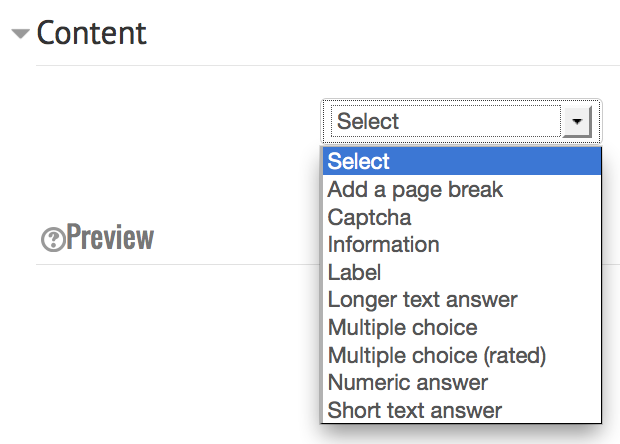
Choose a question type:

question types

  • Add a page break
  • Captcha - A test to make sure a real person is filling in the form and not an automatic spamming program of some sort. Asks a person to write out some distorted text which is displayed on screen. You normally won't need this unless you find you are getting spammed a lot.
  • Information - This allows you to choose to display one of three types of information: the time of responding; the course and/ or the category where the feedback is located.
  • Label - Like a standard Moodle label, this allows you to add abritrary text between questions allowing for extra explanation or to divide the Feedback into sections.
  • Longer text answer - This option is for creating a text box (you specify how big it will appear in rows and columns) which people can write a long answer into.
  • Multiple choice - This will give you a series of radio buttons, which starts on 'Not selected' and then has your options afterwards. Only one can be chosen and 'Not selected' is a valid answer if the question is not set to 'required'.
  • Multiple choice (rated) -

    This is similar to the other multiple choice options, except that each option has a numerical value associated with it. You have the choice of using radio buttons or a drop-down list to display the answers.

    For example:

    How much do you enjoy being in class?
    I love it
    I like it
    It's OK
    I don't like it
    I hate it

    It's not possible to (easily) get out an "average" score - particularly if you're asking the same question before and after an event or course. If the Drop-down List (rated) option is used, then numerical values are associated with each option, allowing an average or other measurements of any responses.

    The above question might look like:

    How much do you enjoy being in class?
    [5] I love it
    [4] I like it
    [3] Its OK
    [2] I don't like it
    [1] I hate it

    Which might allow for an average (e.g. "4.5 this term, up from 3.9 last term") to be calculated.

  • Numeric answer - Here, you ask a question which must have a number as an answer and specify the acceptable range e.g. "How many arms would you like, if more than 2 were possible? (please specify 0-10)" with a range of 0-10 set in the options. It helps if you specify the acceptable range in the question text.
  • Short text answer - This option lets you specify a single line answer, with an input box which is a set number of characters long (you choose). You also specify the maximum number of characters you will accept, so that the answer is not too long and/or does not run over the length of the box on screen.

As you add questions you will see them appear in the preview section below.

As a teacher you cannot answer the questions in the feedback form.

For more detailed information on building your feedback form, please see the MoodleDocs.

» Guide to Moodle

Kontak werfondersteuning
U gebruik tans gaste toegang (Teken in)
Dataretensie-opsomming
Word gedryf deur Moodle